courtney.youngblutt Xplan Expert
2 months agoXplan Expert🤓 Xplan Hint: Resize multi-fields
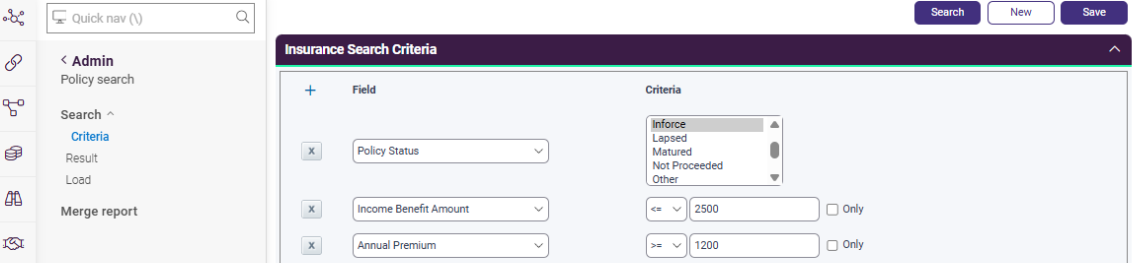
Did you know that you can now resize multi-fields on the interface, allowing you to view all options on screen at once?
Yep, sometimes it is the little things that make a difference. While string fields have always been resizable, viewing a long list of multiple-choice options previously required scrolling.
With this latest update, simply drag to expand the field to view more, or even all, of your options at once! 🙌
No RepliesBe the first to reply
Welcome to the Advisely forums!
This is where financial advice professionals from all walks of life come together to share knowledge, swap ideas, solve problems, and talk all things growth and efficiency.
Here are some tips when posting in the forums:
- Be respectful and courteous to fellow members
- If a reply helped you, mark it as a solution so other users can find it easily
- Take a moment to read through our Community Guidelines
- For Xplan support issues, it's best to raise a ticket in Iress Connect first. You can also search the discussions for posts about the same issue first before starting a new thread.
- Keep an eye out for our 'Ask me anything (AMA)' threads – these are live text-based Q&As with industry and Xplan experts during a set period of time. Find out when the next one is happening here.
- Don’t be shy! You don’t need to be an expert to help someone out. Many users are looking for practical advice, shared experiences, or just a fresh perspective
- Introduce yourself and meet other members here!
We’re glad you’re here – see you around! 😁

Recent Discussions
🤓 Xplan Hint: Tracking Super Contributions
Did you know that there is an element that summarises Super Contributions. It gives you a clear and consolidated view of your client's superannuation contributions, making tracking and compliance ea...andrew.wilson.010 hours agoXplan Expert3Views1like0Comments



Related Content
Do you ever wish there was a way to automate some of your daily routine tasks in Xplan and free up time and work on things that matter?
Join me here on Wednesday 30th October from 3pm to 4pm.
Exp...