 Xplan Expert
🤓 Xplan Hint: Stop Scrolling and Master Your File Notes
How often does this happen? You open a client file and spend the first five minutes scrolling through years of note history, desperately looking for that one critical note or maybe all the notes related to a specific topic.
Using Notes effectively isn't just about capturing the note. It's about making it findable for you and your team in the future.
Here is the 3-layer system to master your file notes:
Layer 1: Type & Subtype (The Filing Cabinet)
This is your primary, structured classification. Think of it as the mandatory filing system for your entire practice.
- Type: The high-level category (e.g., Advice Document, Meeting, Call, Email).
- Subtype: The specific item within that category (e.g., SoA, RoA, Initial meeting, Review meeting, Adhoc meeting, Enquiry).
Your practice should have a clear, consistent structure for these. But this rigid structure can't capture everything. What about the context of the note?
Layer 2: Tags (The Flexible Search Filter)
If Type/Subtype is the "filing cabinet," Tags are the flexible, adhoc "hashtags" you stick on the file.
Tags are not meant to replace your Type or Subtype. You wouldn't create a Tag called "Review" if that's already a Subtype.
Instead, Tags should capture the context or topic that the rigid structure doesn't.
How It Works:
When creating your note, you still select your Type and Subtype as normal. Then, in the 'Tags' field, you add your labels. Unlike Subtypes, you can add multiple tags to a single note.
Tags must be setup in the Note|Tags field definition by your system administrator. Some examples might be; Super, Investment, Insurance, Draft, Needs review, Final
Why do it?
Your Type and Subtype might be Meeting and Review, but the Tags Super and Investment tell the story of that meeting. Now, you can filter all notes for any client that has the Super tag, regardless of whether it was an email, a call, or a review meeting.
Layer 3: Pinning (The "Must-Read" Thumbtack)
This final layer is for visibility. You've classified your note (Type/Subtype) and made it relatable (Tags), but what about that one note that is more important than all the rest?
That's where Pinning comes in.
How It Works:
On the client's 'Notes' page, find the critical note and click the 'Pin' icon (it looks like a thumbtack). This immediately replicates that note to a separate "Pinned" section at the very top of the list, where it will stay until it's unpinned.
The Pro-Workflow: Using All Three
Here is how you combine them for a perfectly managed client file:
Scenario: A paraplanner has just finished drafting strategy notes for an upcoming client SOA.
- Type/Subtype: They select Advice Document and SoA. (The what)
- Tags: They add the tags Draft, Needs Review and Super (The context)
- Pinning: They Pin this note as it is the most important right now. This note may be superseded in the future and then you would unpin this note.
Stop scrolling and start structuring. Using these three layers together saves time and makes your team more efficient.
You can find more information in this Community Article
Welcome to the Advisely forums!
This is where financial advice professionals from all walks of life come together to share knowledge, swap ideas, solve problems, and talk all things growth and efficiency.
Here are some tips when posting in the forums:
- Be respectful and courteous to fellow members
- If a reply helped you, mark it as a solution so other users can find it easily
- Take a moment to read through our Community Guidelines
- For Xplan support issues, it's best to raise a ticket in Iress Connect first. You can also search the discussions for posts about the same issue first before starting a new thread.
- Keep an eye out for our 'Ask me anything (AMA)' threads – these are live text-based Q&As with industry and Xplan experts during a set period of time. Find out when the next one is happening here.
- Don’t be shy! You don’t need to be an expert to help someone out. Many users are looking for practical advice, shared experiences, or just a fresh perspective
- Introduce yourself and meet other members here!
We’re glad you’re here – see you around! 😁

Recent Discussions

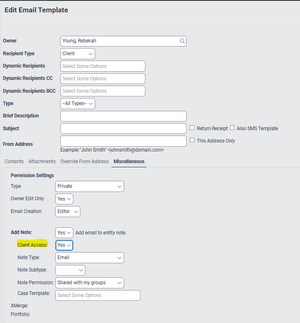
Settings for client access to emails saved as Doc Notes
Does anyone know if or how I can change the standard setting in the client email template so that: Client Access = No At the moment the default is set to yes (as screen shot below) ...rebekah.young6 days agoNetwork Navigator59Views1like3Comments🤓Xplan Hint: Why not try a dynamic benchmark?
Are you using Benchmark Sets in your Cases? Have you found that sometimes, some benchmarks are simply not applicable or relevant to the client's scenario? For example, why would you complete a Risk R...laura.capozzi6 days agoXplan Expert14Views0likes1Comment


Related Content