Xplan Product
😮 Health Premium Loadings modelling in Xplan made easier - Part 2
As part of our commitment to making Xplan more cohesive, we have continued enhancing the modelling of insurance policies that include health premium loadings.
These changes will be available in the Xplan 25.9.459 release.
⚙️ What did we hear from you?
While Client Focus > Existing Insurance allows you to review Insurance Policies and associated product information for new and existing policies, the Health Loading percentage recorded against an existing insurance cover was not imported into a Risk Researcher scenario.
It was unclear in Risk Researcher, within the Premium Modelling > Current Situation table and associated SoA, which existing products contained a Health Premium Loading.
💡 What have we done?
We've updated the existing Insurance Group and Risk Researcher with changes designed to simplify the advice journey and improve modelling!
✅ How does this benefit you?
-
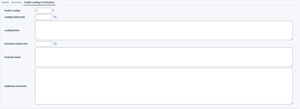
A central location to record and update information regarding policy restrictions
-
.Enhanced productivity by reducing the need for additional work to accommodate implemented policies with health premium loadings in Client Focus.
-
Existing Policies containing a Health Premium loading and/or Exclusion are now identifiable.
👀 So, what's new? Give me the detail...
Within Risk Researcher, we have updated the Premium Modelling > Details screen to differentiate existing policies containing a Health Premium Loading/and or Policy Exclusion and this is controlled from Cover Details > Details > Health Loadings & Exclusions screen within Client Focus.
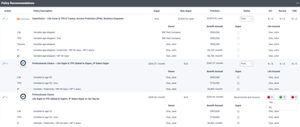
The Existing Insurance record within Risk Researcher now has * applied to any policies where either a Health Premium Loading or Exclusion has been set within the corresponding Client Focus record.
If no Loadings have been set for a scenario, and an existing policy containing Health Premium loadings is selected for review. Users can now apply the existing Health Loadings to the scenario being modelled.
If Yes is selected within the Apply Health Loadings pop-up, Premium Modelling > Details > Loadings is updated with the corresponding Health Premium Loadings as part of the Policy Review process.
Note: Apply Health Loadings pop-up will only be available for subsequent existing policies selected for review if loadings applied within Premium Modelling > Details > Loadings are set back to 0% (i.e. No Loadings).
The Risk Researcher Standard Statement of Advice has been updated to enable clients to easily identify existing cover types that have Health Loading applied to them. Existing policies now display associated Health Loadings in an easy-to-read format.
Clients will also be able to produce associated reports detailing Existing Insurance policies containing a Policy Exclusion via the following syntax, enabling users to specify if an Exclusion is being applied to Existing Cover.
<:=cover.loading_exclusion_notes:>Typically, <:for rec in scenario.recommendations.filter(status='hold'):> is used to display the existing products under review, while updating the syntax with <:=scenario.recommendations.premium_loadings_applied:> enables you to specify if a recommended product contains a policy exclusion.
To specify the specific policy exclusion applied to an Insurance Policy, the following syntax would be used:
<:for recommendation in scenario.recommendations.filter(status='hold'):> <:for cover in recommendation.covers:> <:=cover.loading_exclusion_notes:> <:end:> <:end:>Lastly, implemented recommended policies from Risk Researcher that contain a Health Premium Loading will now automatically have the Health Premium Loading field in the implemented Client Focus Insurance Policy record updated with the applicable Health Premium loading.
💬 I would love to hear your feedback, so click 'reply' and leave your comments and questions down below!
Welcome to the Advisely forums!
This is where financial advice professionals from all walks of life come together to share knowledge, swap ideas, solve problems, and talk all things growth and efficiency.
Here are some tips when posting in the forums:
- Be respectful and courteous to fellow members
- If a reply helped you, mark it as a solution so other users can find it easily
- Take a moment to read through our Community Guidelines
- For Xplan support issues, it's best to raise a ticket in Iress Connect first. You can also search the discussions for posts about the same issue first before starting a new thread.
- Keep an eye out for our 'Ask me anything (AMA)' threads – these are live text-based Q&As with industry and Xplan experts during a set period of time. Find out when the next one is happening here.
- Don’t be shy! You don’t need to be an expert to help someone out. Many users are looking for practical advice, shared experiences, or just a fresh perspective
- Introduce yourself and meet other members here!
We’re glad you’re here – see you around! 😁

Recent Discussions
🤓 Xplan Hint: Tracking Super Contributions
Did you know that there is an element that summarises Super Contributions. It gives you a clear and consolidated view of your client's superannuation contributions, making tracking and compliance ea...andrew.wilson.02 days agoXplan Expert11Views1like0Comments



Related Content