 Xplan Expert
🤓 Xplan Hint: Let your clients Visualise their future from the get-go
Did you know you can use Visualise as part of your onboarding process, providing clients with a projection of their potential financial future within minutes?
Instead of spending your first meeting collecting data, use Visualise to engage your clients right from the start and effectively demonstrate the value of your advice immediately.
Transform your client onboarding:
- Fact-Find playback: Start by playing back the pre-completed (or partially completed) fact find. Use the Visualise fact find screens to confirm the data easily and flesh out further details together. This process allows you to facilitate a two-way conversation rather than a Q&A-style first meeting, building trust instantly.
- Map out the client's goals: Move beyond facts and deep-dive into goals and objectives. Visualise is perfect for capturing your client’s "dream" future. Seeing their aspirations mapped out on screen makes the process instantly more tangible and emotional.
- The "What if you do nothing" reality check: Once you have a clear picture, the true magic begins. You can immediately generate a financial projection that shows your client exactly where they will be in the future if they change nothing. This projection is a powerful, non-confrontational way to highlight the potential gaps in their current strategy.
- Demonstrate instant value: Now, pivot to the power of Visualise. You can instantly demonstrate the financial benefit of simple, practical strategies. What’s the impact of increasing super contributions by just 2%? How does an interest rate increase really affect their cash flow? You can model these scenarios live, allowing the client to participate in designing the strategies that will best work for them.
Using Visualise in the first meeting allows you to move from being a data-collector to a future-forecaster, making the client instantly excited about the journey ahead. Transform your advice conversations with Visualise.
What simple strategy do you find clients react most positively to when you model it for them in Visualise?
👇 Let me know!
Welcome to the Advisely forums!
This is where financial advice professionals from all walks of life come together to share knowledge, swap ideas, solve problems, and talk all things growth and efficiency.
Here are some tips when posting in the forums:
- Be respectful and courteous to fellow members
- If a reply helped you, mark it as a solution so other users can find it easily
- Take a moment to read through our Community Guidelines
- For Xplan support issues, it's best to raise a ticket in Iress Connect first. You can also search the discussions for posts about the same issue first before starting a new thread.
- Keep an eye out for our 'Ask me anything (AMA)' threads – these are live text-based Q&As with industry and Xplan experts during a set period of time. Find out when the next one is happening here.
- Don’t be shy! You don’t need to be an expert to help someone out. Many users are looking for practical advice, shared experiences, or just a fresh perspective
- Introduce yourself and meet other members here!
We’re glad you’re here – see you around! 😁

Recent Discussions
🤓 Xplan Hint: Email Signatures That Stick!
Did you know Xplan recently updated how email and SMS signatures work when using the 'Override From Address' option? Why the Change? No more worrying about an email going out with the wrong signa...courtney.youngblutt1 month agoXplan Expert204Views3likes14Comments
Settings for client access to emails saved as Doc Notes
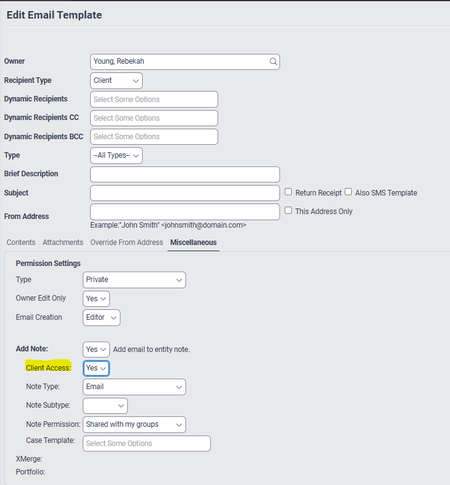
Does anyone know if or how I can change the standard setting in the client email template so that: Client Access = No At the moment the default is set to yes (as screen shot below) ...rebekah.young1 month agoNetwork Navigator89Views1like3Comments🤓Xplan Hint: Why not try a dynamic benchmark?
Are you using Benchmark Sets in your Cases? Have you found that sometimes, some benchmarks are simply not applicable or relevant to the client's scenario? For example, why would you complete a Risk R...laura.capozzi1 month agoXplan Expert38Views0likes1Comment



Related Content