clients
16 Topics
Adding attachment icon to Client Portal Messages
Hi Team Please can you consider adding an "attachment" icon like a paperclip to file notes sent to clients via the client portal that have an attachment to them? At the moment, and particularly if there are multiple lines of text in a file note, it is not clear to a client that they need to scroll right to the bottom to see\access an attachment to a file note. We will change our wording in messages to make it clear that the attachment can be "found below", but an attachment icon would be helpful for clients. Screenshots attached for context25Views0likes1Comment31st July AMA: I'm Courtney Youngblutt, Xplan expert, Ask Me Anything!
We all know efficient processes and smart tech use are non-negotiables for scaling your business and serving more Australians. In Episode 2 of the Advisely Masterclass, I worked with Retire Aware’s Kylie Springall to lay the tech foundations for a high-volume advice model. Whether you're just starting out, like Kylie, or growing your business, it can be easy to overlook the capabilities of the tech you already have. If you’ve got a bold vision like Kylie and you’re building out your advice processes, trying to scale efficiently, or just need Xplan to do more of the heavy lifting, this AMA is your chance to ask. For example: How do I track which referrers bring in my best clients? What’s the best way to ensure my file notes meet compliance obligations in Xplan? How can I track my marketing efforts? Can I invoice my clients from Xplan? How can I utilise Visualise in the onboarding process When should I introduce the Client Portal into my fact-find process Join me here on Thursday 31st July from 3pm to 4pm AEST. I’ve worked with hundreds of practices to optimise processes and boost everyday efficiencies. If you have a repeatable process, there’s a good chance I can make it more efficient for you with Xplan. I’m here to help! Start popping in your questions below and Ask Me Anything! 💬 This AMA is text-based, so I’ll answer your pre-submitted questions in the scheduled time. 📆 Click here to save the date in your calendar. 🔔 Don’t forget to hit the bell in the top right corner to be notified. 🎙️ Let us know what you thought of the AMA and what topics you would like to see next here.340Views7likes21CommentsWant to know exactly what your client has updated in their digital fact find? Now you can!
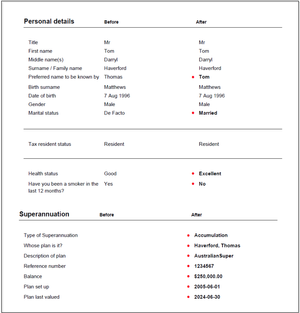
Fact find comparison report is now available to all users Background Client Portal allows users to provide their clients with a digital fact find to complete for new and existing clients. The data is updated immediately in Xplan and allows advisers to capture data more efficiently. However, even though all changes are logged in the audit trail, getting a clear picture of what is updated wasn't always easy. What's new? Upon completion of a fact find in Client Portal, a comparison report is generated and saved as a file note against the client. All data from the fact find is displayed and any changes are clearly highlighted. How do I activate it? No extra steps are required to configure or activate the comparison report, it is already live in Client Portal and available now. Simply follow the existing fact find process by setting the fact find status to 'Unlocked' and when the client submits their fact find, a file note is created with the comparison report attached. Got questions or feedback? We always welcome feedback on our products and if you wish to let us know your thoughts, or if you have any questions, please don't hesitate to post them below.141Views6likes5Comments🤓Xplan Hint: When your file notes need a new home
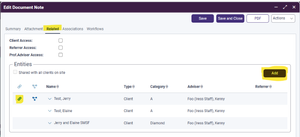
Did you know that you can move file notes between entities? We still hear (to our collective horror) about users moving file notes between entities by copying and pasting. But there’s a much quicker way! In the file note’s ‘Related’ tab, just click on the Add button to add other entities, and use the chain link button to link/unlink the note from any entity.46Views2likes1Comment🤓Xplan Hint: Getting fancy with client search
Did you know about client search prefixes? Not many users know about this, but you can search for clients using details aside from just their name. For example, if I want to search for clients with the postcode “2000”, I can just use the prefix pcode in the Quick Search box: This could be useful if you need to do specific searches; e.g. if you’re meeting a client and want to see who else is in the area, or if you received a missed call and need to search by the phone number. Check out this handy Community guide on the full list of available prefixes.64Views2likes1CommentPoll: Are you in a position to take on more clients?
Advice 2030: The Big Shift report revealed a potential $2.1bn in new revenue and nearly half a million new advice clients by 2030 for advice businesses that can adapt to meet this demand. I am interested to know, are you currently wanting to and in a position to take on more clients in the next 6-12 months? If so, how many, and is finding the right clients a challenge for you? 0-5 5-10 10-30 30+ Comment below to share your thoughts!83Views3likes5CommentsHow do you ensure a consistent client experience?
In follow up to my article No adviser is an island, I'd love to know what practices are doing to keep the client experience front of mind for everyone in the team? How do you ensure the clients receive a cohesive experience from everyone they encounter in your practice?114Views4likes3CommentsCreating your vibe
You need one thing above everything else, to create a vibe which is genuine and personal for your clients – you must truly know your clients. Unfortunately, it’s our experience that very few practices are taking full advantage of their CRM functionality to capture the information they need to create that key personal, relationship building information. And, even if it’s being collected at the onboarding stage, few practices deliberately maintain this information. Simple info such as their children’ names (and their occupation or education level), details of the client’s preference for morning or evening meetings, coffee or tea, in-person or virtual meetings, wine or the ballet or both (will allow you to provide interesting content for your communications, plan events which appeal and so on), what the client is planning to do once the retire, when’s their next major holiday and so on. In other words - the ‘life stuff’. What info do you collect (and maintain) to build meaningful, long term relationships with your clients?80Views4likes2CommentsWhat are the top 3 things you do in your practice to provide a great client experience?
I loved Kim-Payne 's latest video on Baselines, blind spots and black holes in the client experience. It can get so overwhelming to know where to start sometimes, focusing on those moments that really matter is a great approach. Have you watched the video? I'm keen to hear what top 3 things you do in your practice to excite and delight your clients?88Views3likes0CommentsHow to code birthday greetings in XPLAN
Hi Everyone, we are looking for assistance in coding the birthday email for clients. We need help with setting up coding so that the birthday greeting shows only the client who is celebrating their birthday on that day. Currently, the coding is showing both the client and their partner names in the email template that goes out to the client. We want to edit the coding so that it only shows either the client name or the partner name. Can anyone help us with tips on how to edit the coding to achieve the above result? Thanks!Resolved401Views5likes14Comments